Click the Start Button
Click Control Panel
Click Region and Language
Click the Keyboards and Languages tab
Click Change Keyboards
On the Text Services and Input Languages dialog, click Add
Expand the + next to Korea
Expand the + next to keyboard
Check KoreanClick Okay
Windows will now display a language bar that will allow you to select an input language:

Click EN to switch to Korean:

Click Soft Keyboard. An on-screen keyboard will appear:
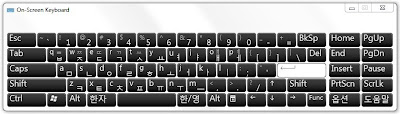
You can also access the virtual keyboard by typing On-Screen Keyboard in the Windows Search box, or via the Control Panel's Ease of Access Center.
Enter Korean characters by typing on the virtual keyboard. You can also write Korean characters without the On-Screen Keyboard. See this about.com article: How to write korean using my computer?
